Tower Rush App and Mobile
Tower Rush works on smartphones, tablets and desktop devices. The game can run through a supported browser, so installing a separate app is not always required. Some platforms also include the Tower Rush game inside their own Android or iOS applications. In this case, the app belongs to the platform, while Galaxsys remains the game developer.
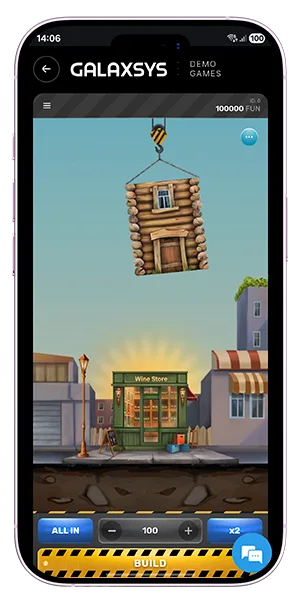
Tower Rush can be opened on a smartphone through a supported mobile website. The main interface stays compact, with the tower, current value and main controls kept in view. The Tower Rush online game does not depend on a large slot-style layout with reels and many symbols. This makes it easier to fit the main action on a smaller screen.
Android phones, iPhones and tablets can all be used when the platform supports the game. A separate Tower Rush app is useful only when a platform provides one and the player prefers using an installed application instead of a browser. For browser play, the main requirement is a modern browser and a stable connection.
There are two common ways to open Tower Rush on mobile: through a browser or inside a platform app. The browser version does not require installation. The player opens the platform, finds the game and starts it directly from the mobile site. The main differences are simple:
A platform app can include Tower Rush together with other games from Galaxsys and other providers.
|
Access Type |
Download |
Where It Runs |
| Mobile browser | No | Web browser |
| Platform app | Yes | Android or iOS app |
| Unknown APK | Depends | Source should be checked first |
The source and developer should always match the platform that provides the application.
On Android, Tower Rush can normally run through Chrome or another supported mobile browser. No extra installation is needed for this type of access. Some platforms also offer their own Android apps. If Tower Rush is included in one of them, the game opens inside the platform application rather than through a separate Galaxsys APK.
A Tower Rush app download should therefore come from a known platform or its official download page. An APK from an unknown website should not be treated as official only because the file name includes Tower Rush. Before installation, it is worth checking the developer name, file source and permissions requested by the app.
Tower Rush also works on supported iPhone and iPad browsers. The mobile interface keeps the same basic layout, so the player still sees the tower, current value and controls without needing a desktop-sized screen. Some platforms may offer an iOS application that includes the game. In that case, the app belongs to the platform rather than Galaxsys. There is no need to look for a separate IPA file when browser access is already available.
A Tower Rush app download is not required for everyone. If the game opens correctly in a mobile browser, there is no need to install extra software. This also avoids using storage space for another application. A separate app can make sense when the platform itself offers an official Android or iOS client and includes Tower Rush in its game list.
The Tower Rush app should be downloaded only from a source connected to that platform. Random APK or IPA files can use the game name without having any connection to Galaxsys. Updates should also come from the same source as the original application. Installing a new file from an unrelated website can create compatibility or security problems. For many users, browser access remains the simplest way to open the game on a phone.
Tower Rush demo mode can also be used on supported mobile devices. The demo uses virtual credits, so it is possible to check the mobile layout without using a real-money balance. It shows where the main buttons are placed, how much screen space the tower uses and how quickly the interface reacts during a round. Tower Rush demo is also useful for checking whether the game fits comfortably on a particular phone or tablet. The demo does not change the game mechanics. It simply gives access to the same basic interface with virtual credits. No special app is required when the demo is available through the browser.
The Tower Rush game uses a simple screen layout. The tower stays in the main part of the display, while the current value and action controls remain close to it. On a phone, this means the player does not need to move between several screens during a normal round. Touch controls replace mouse clicks on mobile devices. A tablet gives more screen space, but the basic layout stays the same. The main difference is the size of the interface rather than the way the game works. This simple structure also makes the game easier to use in portrait or landscape mode when the platform supports both.
Tower Rush does not require a powerful gaming phone, but the browser and operating system should be reasonably up to date.
A stable internet connection helps the game load correctly and keeps the current round information visible. If the connection drops, the screen may stop updating until access is restored. If the mobile version loads slowly, several simple checks can help:
A faster connection does not change the RNG or improve the result of a round. It only helps the interface communicate with the platform without unnecessary delays.
The Tower Rush online game can be opened through supported websites without installing unknown files. When an app is used, the source matters more than the file name. An APK can be called Tower Rush even if it has no connection to Galaxsys or the platform where the game is normally available. Before installing an application, check:
A Tower Rush app from a recognised platform should clearly show who provides the application. If the source is unclear, browser access is the simpler option.
Mobile play keeps the normal game features. Frozen Floor, Temple Floor and Triple Build can also appear during supported mobile sessions. More details about these features are available on the Bonus Floors page.